Sense V2 Flip Clock & Weather
MACHAPP Software LtdWeather
4.23.31K Reviews
- Version
- 9.14.0
- Installs
- 1.00M
- Age Rating
- Everyone
Screenshots
Our Review of Sense V2 Flip Clock & Weather
 Analysis by Appyee
I use a weather app most when I’m already thinking about the next thing: whether to take a jacket, when to leave, or if an outdoor plan needs a rethink. Sense V2 Flip Clock & Weather brings those quick checks together with a prominent flip-style clock, so the weather sits alongside something I’m likely to glance at anyway. Its appeal is practical as well as visual, though the experience depends on having current weather information available when I need it.
When a quick glance depends on a connection
Weather is not a static part of this app. Current conditions and forecasts are useful only when the information has been refreshed, so I treat the display as a handy guide rather than a guarantee that every change outside will appear instantly. If I’m deciding whether to walk out in light rain, I still look at the sky and use my judgement; the app helps me prepare, not eliminate uncertainty.
That distinction matters most when plans are time-sensitive. Before leaving home, I can check the temperature and wind, then decide whether a thin layer is enough or whether I should dress for a colder trip. For a longer journey, I’d check again nearer the time rather than assume the first glance will stay current. It’s a small habit, but it makes a weather widget more useful than treating it as a set-and-forget forecast.
A home-screen tool for different routines
The flip clock and weather combination makes most sense for someone who likes useful information visible on the home screen. Instead of opening a dedicated forecast app every time, I can make a quick check while reaching for another app. The clock gives the widget a reason to remain in view throughout the day, while the weather details add context to that glance.
It is less compelling if you prefer a very minimal home screen or already rely on a clock and weather display that fits your phone’s layout. A widget takes up space, and that space has an opportunity cost: a messaging shortcut, calendar view, or other tool may be more valuable to you. I’d try a modest layout first, then keep the widget only if I actually use the information it puts in front of me.
The app is free to install, with in-app purchases ranging from around five to seventeen dollars per item. I’d begin with the free experience and decide whether its look and daily usefulness justify paying for extras. Since the purchase is optional, there’s no need to treat customization as a prerequisite for getting a basic clock-and-weather setup.
How it fits beside other weather choices
Compared with a phone’s built-in weather option, Sense V2 puts more emphasis on the clock-and-widget presentation. That is a real advantage if you enjoy the flip-clock look and want weather visible without opening a separate screen. A conventional forecast app can be the better choice if your main priority is digging into weather information rather than styling your home screen; the best option depends on whether you value a glanceable display or a dedicated forecast workflow.
There is also a useful middle ground: keep this app for everyday checks, but consult another trusted source when a decision has higher stakes, such as a long outdoor outing or a journey where changing conditions matter. I don’t see that as a flaw unique to this app. It is a sensible way to use any forecast, especially when a quick widget view is not enough to answer the question you have.
Small habits that make the widget more useful
One practical tip is to place the widget where your thumb and eyes naturally land, rather than choosing a spot only because it looks balanced. A weather glance is valuable when it interrupts your routine as little as possible. If you travel between places, the multiple-location option can also help you compare conditions before leaving, instead of switching back and forth between unrelated screens.
For a shared household, checking the forecast before arranging errands can turn the app into a simple planning aid: I might choose to do the outdoor task first if the forecast looks less suitable later. I would still treat a forecast as a plan, not a promise. Weather changes, and a widget is at its best when it helps me notice what to consider rather than deciding for me.
Sense V2 is developed by MACHAPP Software Ltd and sits in the weather category. It has an average rating of about 4.1 from roughly 69,000 ratings, with around 3,300 written reviews and more than a million installs. Those figures suggest it has found a substantial audience, but they don’t tell me whether its particular visual style will suit your phone; that is something the home-screen experience decides.
What to expect when conditions or connectivity change
If weather information does not appear as fresh as I expect, I first check whether the phone can connect and whether the displayed location is the one I intended to use. Then I reopen the weather view or give it another moment before making a decision based on it. These are ordinary troubleshooting steps, not a guarantee of a particular refresh behavior, but they help separate a location or connection issue from a preference about how the app looks.
For data-conscious use, the useful question is how often you need to look, not how many times you can refresh. A glance before leaving and another before a later commitment may be more helpful than repeatedly checking the same screen. If you are trying to limit mobile data, you can make weather checks when you already have a connection available and avoid refreshing out of habit; I would not rely on a weather display as a substitute for checking conditions when the decision matters.
The app is rated for Everyone, was released on December 27, 2012, and its current version is 9.02.3. It requires Android 7.0 or later. I’d still check that your device’s software supports it before installing, particularly if you keep an older phone in service.
Aesthetics Meet Functionality
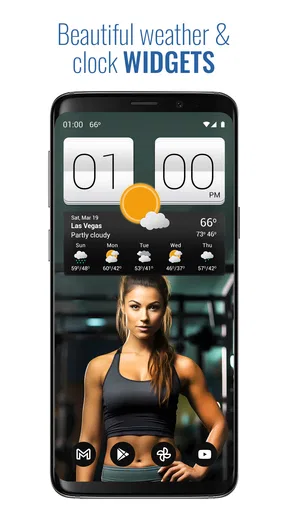
Let’s dive right in. From the moment I installed Sense V2 Flip Clock & Weather, I was struck by how sleek and stylish it is. It’s like the app version of that one friend who’s effortlessly cool. The flip clock design is a nod to retro vibes, reminiscent of old-school alarm clocks but with a modern twist. It's not just about looks, though. The app is pretty functional too.
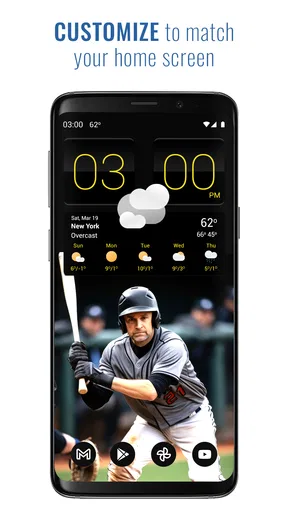
One of my favorite features is its customization options. You can tweak the appearance with different themes and sizes, making it truly your own. It’s like having a little piece of art on your home screen. Plus, it’s not just a clock—it’s your go-to weather station too. I mean, who doesn’t love a two-in-one?
Weather Details at Your Fingertips
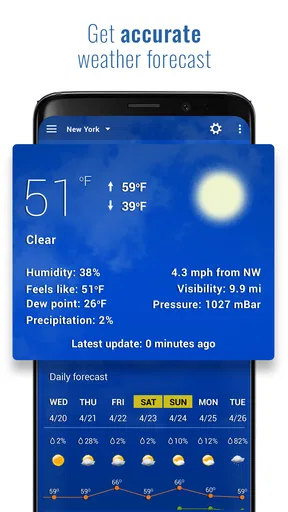
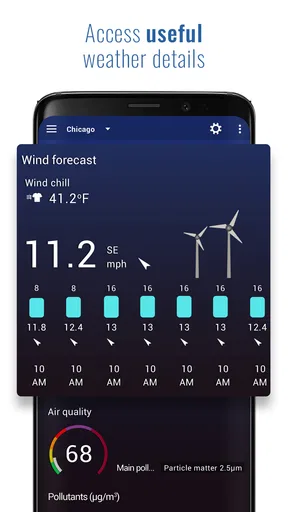
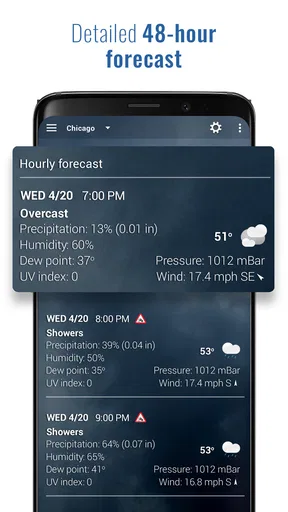
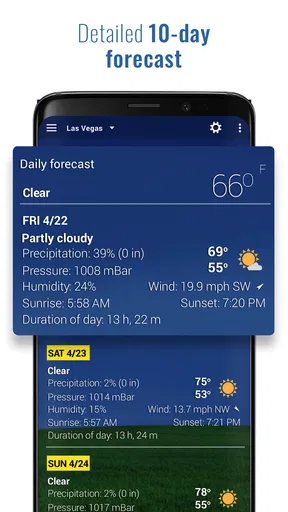
Now, let’s talk about the weather aspect. This app doesn’t skimp on the details. You get everything from current temperature, humidity, and wind speed, to a more detailed forecast for the week ahead. And it’s all presented in a way that’s super easy to read. I found myself checking it more often than I probably needed to, just because it was so darn convenient.
The animation of the flip clock is smooth, and the transitions are seamless. It gives a bit of life to your screen without being overbearing. It's like having a tiny weather channel right in your pocket, minus the constant commercials.
Usability and Performance
Alright, let’s get into how it performs. Setting up the app was a breeze. The interface is intuitive, so you won’t need a manual to figure things out. Even if you’re not a tech wizard, you’ll find it user-friendly. Everything is where you’d expect it to be, which makes navigation a walk in the park.
Performance-wise, it’s solid. The app updates in real-time, which is crucial for any weather-related application. I didn’t experience any crashes or bugs, which is always a plus. It’s lightweight too, so it won’t hog your phone's resources or battery life, which is great if you're trying to conserve energy while on the go.
Features That Stand Out
Now, I have to mention some standout features that make this app a keeper. First off, the widget options. You can add them to your home screen, and they look fantastic. The widgets are customizable too, so you can adjust them to fit your style.
Another feature that caught my eye is the location-based weather updates. It’s smart enough to detect where you are and provide accurate weather information for your area. No more guessing whether that ominous cloud is headed your way or not!
The app also supports multiple locations, which is perfect if you're a frequent traveler or just like to keep tabs on the weather in different parts of the world. You can easily switch between cities and see what the weather's like across the globe.
The Verdict
So, what’s the final word on Sense V2 Flip Clock & Weather? In my book, it’s a win. It’s a beautiful mix of style and substance. Whether you're a weather enthusiast or just someone who appreciates a good-looking clock, this app has something to offer.
It’s not just about telling time or predicting if you’ll need an umbrella. It’s about doing it with flair. The app is straightforward to use, reliable, and pleasing to the eye. If you’re in the market for a new clock and weather app, give this one a go. It might just become your new daily companion.
In a world where we’re constantly on the go, having a reliable and stylish app like this makes life a tad easier—and a lot more stylish!
My connectivity verdict
For me, the strongest case for Sense V2 is the combination of a readable clock, weather details, and flexible widgets in one familiar place. The trade-off is that the weather side is only as helpful as the information available at the moment you check it, so I use it for everyday planning rather than decisions that need certainty. If you want a decorative, glanceable companion for your home screen, it is an appealing option; if you want the deepest forecast analysis or the simplest possible display, a dedicated alternative may fit better.
I’d recommend trying it if you enjoy shaping your home screen and often make small plans around the weather. I’d skip it if you rarely use widgets, dislike visual customization, or prefer to open a dedicated forecast tool only when you need one. That is the clearest way to decide: the app earns its place when its clock and weather view becomes part of a routine you already have.
Verdict
Strengths of Sense V2 Flip Clock & Weather
- Intuitive interface with sleek design.
- Accurate and detailed weather updates.
- Customizable clock and widget options.
- Minimal battery consumption.
- Offers both free and premium features.
Limitations of Sense V2 Flip Clock & Weather
- Ads can be intrusive in the free version.
- Limited customization in free mode.
- Occasional lag on older devices.
- Premium features require a subscription.
- Weather updates need internet connection.
Other Releases by MACHAPP Software Ltd
View All
Transparent clock and weather
Weather4.2

Sense Flip Clock & Weather
Weather4.2

Transparent clock weather Pro
Weather4.1

Sense flip clock & weather Pro
Weather4.3
Similar Picks in This Category
View All
Weather - By Xiaomi
Xiaomi Inc.4.1

Weather & Radar Forecast
WetterOnline4.8

Weather
OneLouder Apps4.6

AccuWeather: Weather Radar
AccuWeather3.6

The Weather Channel - Radar
The Weather Channel4.6

1Weather Forecasts & Radar
OneLouder Apps4.3
Frequently Asked Questions
What features does Sense V2 Flip Clock & Weather offer?
Sense V2 Flip Clock & Weather is renowned for its visually appealing flip clock display, customizable weather widgets, and detailed weather forecasts. Users can personalize themes, access hourly and weekly weather updates, and receive alerts for severe weather conditions. The app also supports multiple languages, making it versatile for users worldwide.
Is Sense V2 Flip Clock & Weather free to use?
Yes, Sense V2 Flip Clock & Weather offers a free version with basic features, including the flip clock and essential weather forecasts. However, to access premium features such as ad-free usage, advanced customization options, and additional weather data, users may opt for in-app purchases or a subscription plan.
How accurate are the weather forecasts in the app?
The app utilizes reliable weather data sources to provide accurate forecasts. While no weather app can guarantee 100% accuracy, Sense V2 Flip Clock & Weather is generally reliable for daily and weekly forecasts. Users can expect timely updates and alerts for any significant weather changes in their area.
Can I customize the appearance of the clock and weather widgets?
Absolutely! Sense V2 Flip Clock & Weather offers extensive customization options. Users can change themes, font styles, colors, and even the layout of the widgets. This allows for a personalized experience, enabling users to match the app’s look with their device’s aesthetic or personal preference.
Does Sense V2 Flip Clock & Weather drain battery quickly?
The app is designed to be efficient and should not significantly impact battery life. It uses optimized background processes to update weather data and display the clock. However, users who enable frequent updates or use animated themes may notice a slight increase in battery consumption. Adjust settings as needed to optimize performance.
